IE 4.0 - UNAUTHORIZED
DISCLAIMER - All of this information comes from an anonymous source. We do *not* have a copy of the Memphis beta, the source simply sent us information and screenshots. If you find the information here a violation of privacy, please let us know.
IE 4.0, just the name sends shivers down the back of anyone that's heard of it. Those that have used it know that it will shortly be the definitive standard by which all other browsers will be judged.
But what is it exactly? What does it look like? ActiveDesktop? Not since the release of Windows95 itself has a new computer application garnerd so much interest. Netizen's the world over congregate on Usenet discussion groups like microsoft.public.inetexplorer.ie4 that carries thousands of messages a week, to discuss the rumors of something that doesn't even exist yet.
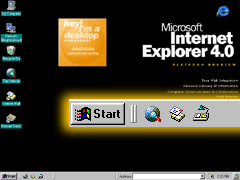 IE 4.0 Unauthorized was fortunate enought find someone that has used one of the latest iterations of IE 4.0, the elusive Platform Preview Release, or PPR.
IE 4.0 PPR as discussed here was bundled with a private beta release of Memphis, Microsoft's yet unnamed next generation operation system. And according to our sources, it is difficult to tell where the operating system leaves off, and the browser begins.
Over the next week, we will be publishing various details regarding these releases, the first in our series takes a look at popular conceptions of what features Memphis and IE 4.0 have and how they appear in the iteration that we discussed.
Next Installment: Under the Hood of IE 4.0 PPR
Installation Process
As alluded to elsewhere, the installation process for Memphis is a vast improvement over the installation process for Windows95. It is much more streamlined, and user interaction is minimized. The entire procedure takes on average about 20 to 25 minutes on newer processors and does not present a big challenge for most configurations. The extended hardware detection phase has been removed, and the hardware detection that does take place is quick and very efficient in picking out the configuration of the PC.
Multiple Display Support
This is apparently the neatest feature of the new OS. If you have access to two PCI graphics adapters, and two monitors, you can run them independent of each other on the same machine. This allows for greater flexibility when using desktop publishing programs, graphic design, web surfing - the list goes on and on. This is one feature that we can't wait to see in action.
Win32 Driver Model (WDM)
You can finally kiss multiple driver versions good-bye! This release of Memphis features a unified driver model that allows NT hardware drivers to run under Memphis and vice-versa. This is an excellent feature that minimizes cost of ownership, as well as reduces the development costs on behalf of the hardware manufacturers.
FAT-32
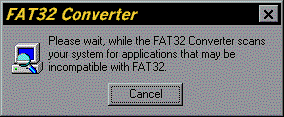
Not too much news here, FAT-32 premiered in OSR-2 and will ship with Memphis as a full-end user version. This version also allows for conversion to FAT32 from FAT which makes upgrades much easier.
Internet System Update
Need that new service pack? How about the latest cover page editor for Microsoft Fax? The Internet System Update tool is a web based system support module that will automatically update your operating system via the Internet. Pioneered by companies like Symantec, the Internet System Update software takes Internet based support to the next level.
Shell Script Support
Windows finally enters the big leagues with the addition of command line and windows scripting support (Cscript & Wscript). Full support for Microsoft's VbScript and JScript are available from a windowed or command line interface. Look for a whole slew of nifty little tools from indie developers over the next little while that take advantage of these new tools.
The Settings Wizard
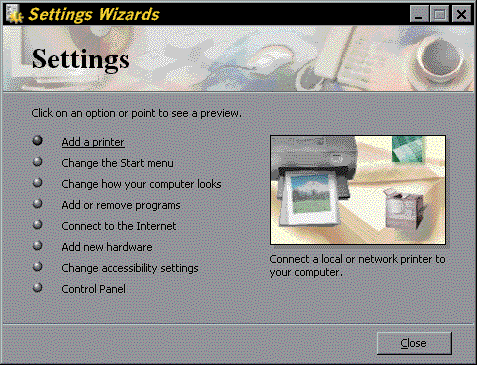
The Settings Wizard is a great new utility that brings together some of the more commonly used "wizards' in one common interface. By using the Settings Wizard you can change your printer settings, customize your Start menu, alter the look of your desktop, install programs, configure your Internet settings, add new hardware and more! The main benefit that this application has over the control panel is that all of the customizable options are presented as wizards instead of the often dauting settings that users find elsewhere in windows.

Dynamic/Customizable TaskBar
Our source indicated that the jury was still out on this new feature. This new version of the taskbar is very similar to the tool-bars found in the newer MS products. Fully customizable, it allows you to type in URL's directly, setup Quick Launch icons and create user definable tools. It sounds rather interesting, but as our source put it, "...it can be extremely confusing."
Dr. Watson - 32
The good Doctor is now a fully 32 bit application. Typically used to take a snapshot of your system when a crash occurs, Dr. Watson generates reports that can be analyzed by technicians to help diagnose potential problems with your PC's setup. Additionally, it has a lot of benefit for application developers who need to debug their software.