
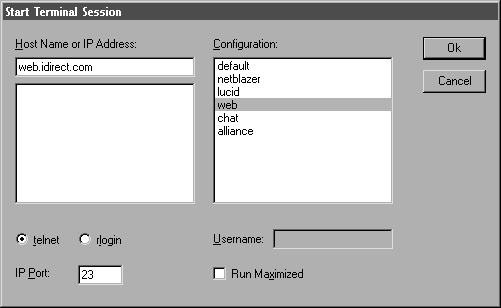
 In order to gain behind the scenes UNIX access to the Do-It-Yourself! Web
server and access your personal .HTML files, you will need to use a telnet
application and login. The screen capture to the left displays a sample
configuration session using WinQVT. This is an excellent telnet application,
however there are several other that you can choose from. Be sure to enter
"web.idirect.com" as the address you wish to connect to. This addressed is
sometimes called the Host Name as is shown in the example.
Once you click on okay, assuming that you have everything entered correctly,
the login prompt for the system will come up...
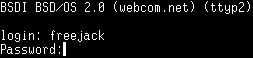
Assuming that you entered in a valid username, and the correct password, the following screen will pop up...
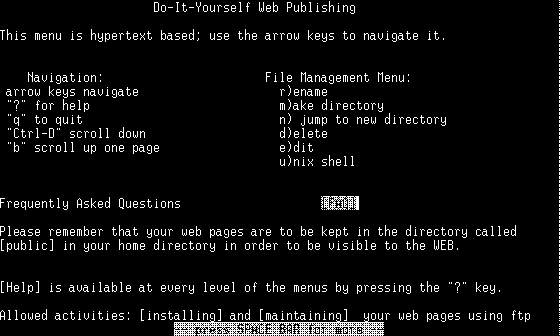
The first thing that you may want to do is leave the shell. This will allow you to utilize some of the more advanced editing functions of UNIX. To do this, hit the space bar, and then select the SHELL link using your arrow keys as is shown below...

This will dump you into a prompt similar to this one...

As is shown above, you will need to change directories to the "public" directory. The "public" directory is where you will need to place all the files that you want to make available on the WWW. Anything located here, or in any sub-directory below "public", is what is called "world-readable".
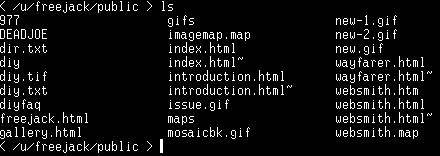
To get a listing of the files that are in this directory, or any other directory that you are located in, simply type "ls" and then hit enter as is shown in the example above.
